
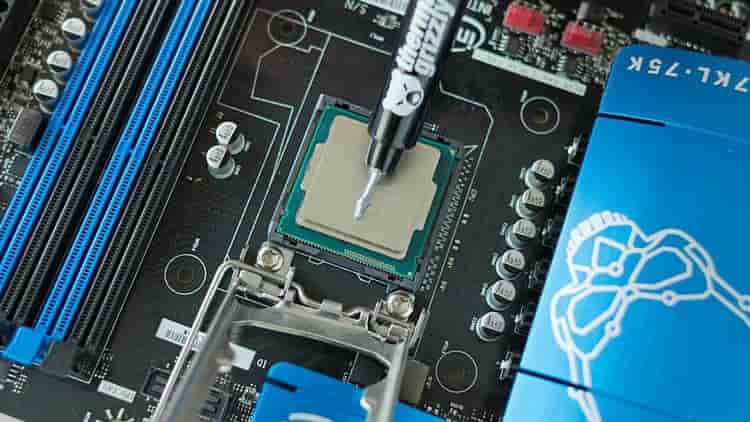
Thermal paste's job is simple: fill the microscopic gaps between your CPU's heat spreader and your cooler's contact plate so heat actually transfers instead of getting trapped in a layer of air. No paste — or dried-out paste — and you're looking at throttling, shutdowns, or worse.
If your tube ran dry the night before a deadline and the nearest store is closed, you do have options. Neither is a permanent fix, and we're going to be blunt about that before we get into the how.
Both methods below are stopgaps, not replacements for real thermal paste. Expect to swap in a proper compound within about 3 months — sooner if you're gaming or rendering under sustained load. Monitor your temperatures weekly while running either mix. We are not responsible for any damage to your processor or yourself if you attempt this.
Method 1: Diamond Powder Paste
This is the more legitimate of the two — diamond powder is genuinely thermally conductive, which is why it shows up in some commercial pastes. It's also the messier and more hazardous option to make.
What you need:
- A respiratory mask
- Diamond powder
- Silicone grease
- An empty syringe
How to make it:
- Put on the mask before you open the powder. Diamond powder is fine enough to inhale, and inhaling it is genuinely bad for you — don't skip this step to save time.
- Combine the diamond powder and silicone grease inside a sealed plastic bag.
- Knead the bag by hand until the mixture becomes a viscous, cream-like liquid. There's no exact ratio here — you're going by texture, not measurement.
- Transfer the mixture into the syringe. This makes application controllable and keeps your hands out of the compound.
- Remove the old, dried paste from your CPU and cooler before applying the new mix, same as you would with any repaste.
Diamond powder is highly dangerous to inhale. Mix it in a ventilated area, keep the mask on for the entire mixing process, and seal the bag immediately when you're done.
Method 2: Toothpaste and Vaseline
This is the true "nothing else in the house" option, and it works far better than it has any right to — with one catch.
The ratio: roughly 70–80% toothpaste to 20–30% Vaseline (petroleum jelly).
Plain toothpaste alone will dry out on your CPU within 6 to 12 hours, which makes it useless on its own for anything but a five-minute stress test. Mixing in Vaseline slows that drying process down and keeps the compound workable for meaningfully longer.
Requirements:
- The toothpaste must be grit-free — gel formulas, not the kind with whitening granules or micro-beads. Any abrasive particles in the mix degrade heat transfer instead of helping it, which defeats the entire point.
- Mix the two together until you get an even, paste-like consistency, then apply exactly like you would normal thermal paste: a small dot in the center of the die, cooler mounted straight down.
This method is faster and far less risky than the diamond powder route, but it's also the shorter-lived of the two — treat it as a same-day or same-week fix, not a "few months" one.
Which One Should You Use
If you have both diamond powder and a mask on hand — unlikely for most people — that mix lasts longer and holds up better under load. For almost everyone else, toothpaste and Vaseline is the realistic option: it uses stuff already in your bathroom cabinet and gets a dead system running again in minutes.
Either way, this is a bridge, not a destination. Order proper thermal paste as soon as you can, and swap it in the moment it arrives — don't wait for temperatures to creep up as your reminder.
Written by Saad Nadeem
Founder & Writer · TwiceGaming
Founder of TwiceGaming. Writes hardware reviews, game guides, and how-tos with a focus on honest, practical advice — no sponsored fluff, no filler.